Adapter
Author Ter-Petrosyan Hakob
The Adapter pattern is a structural design pattern. It lets two incompatible interfaces work together by providing an adapter object that converts calls from one interface into calls to the other.
Real‑World Example: API Format Adapter
Two services must communicate: one sends data as JSON, the other expects XML. An adapter converts the format
so both services work without changing their code.
Adapter Variants
There are two main approaches to implement the Adapter pattern:
- Class Adapter: Uses inheritance. The adapter extends the adaptee class and implements the target interface.
- Object Adapter: Uses composition. The adapter holds a reference to the adaptee object and implements the target interface by delegating calls.
Example: JSON/XML Format Adapter
This example shows both Object Adapter and Class Adapter implementations for converting XML data into JSON format.
Object Adapter Example
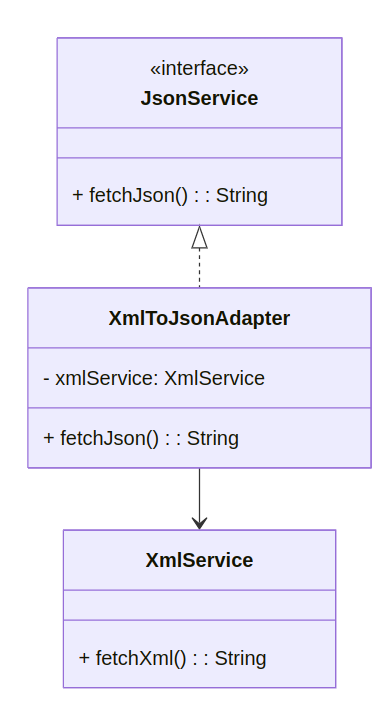
The Object Adapter wraps an XmlService instance and implements the JsonService interface.
Class Diagram:
Code:
// Target interface for JSON clients
public interface JsonService {
    String fetchJson();
}

// Adaptee: existing XML service
public class XmlService {
    public String fetchXml() {
        // returns data in XML format
        return "<user><name>Alice</name><age>30</age></user>";
    }
}

// Object Adapter converting XML to JSON
public class XmlToJsonAdapter implements JsonService {
    private XmlService xmlService;

    public XmlToJsonAdapter(XmlService xmlService) {
        this.xmlService = xmlService;
    }

    @Override
    public String fetchJson() {
        String xml = xmlService.fetchXml();
        // simple conversion logic (illustration)
        return xml
            .replace("<user>", "{ \"user\": ")
            .replace("<name>", "\"name\": \"")
            .replace("</name>", "\" , ")
            .replace("<age>", "\"age\": ")
            .replace("</age>", " }")
            .replace("</user>", " }");
    }
}

// Client using Object Adapter
public class ClientApp {
    public static void main(String[] args) {
        XmlService xmlService = new XmlService();
        JsonService jsonAdapter = new XmlToJsonAdapter(xmlService);
        System.out.println(jsonAdapter.fetchJson());
    }
}
Class Adapter Example
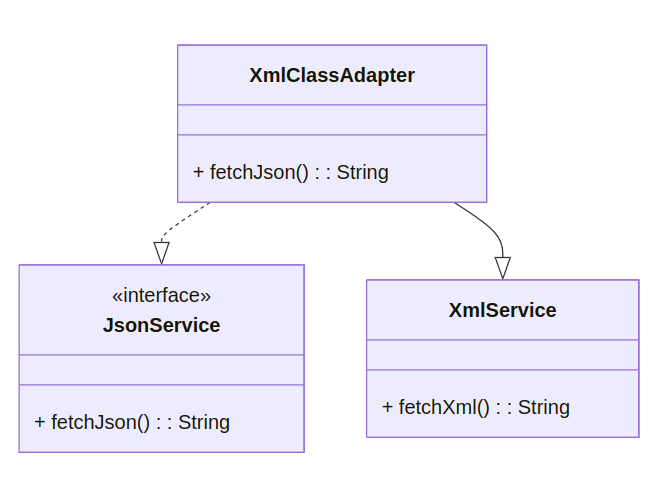
The Class Adapter extends XmlService and implements JsonService directly.
Class Diagram:
Code:
// Class Adapter converting XML to JSON
public class XmlClassAdapter extends XmlService implements JsonService {
    @Override
    public String fetchJson() {
        String xml = super.fetchXml();
        // convert xml to json (same logic)
        return xml
            .replace("<user>", "{ \"user\": ")
            .replace("<name>", "\"name\": \"")
            .replace("</name>", "\" , ")
            .replace("<age>", "\"age\": ")
            .replace("</age>", " }")
            .replace("</user>", " }");
    }
}

// Client using Class Adapter
public class ClientAppClass {
    public static void main(String[] args) {
        JsonService adapter = new XmlClassAdapter();
        System.out.println(adapter.fetchJson());
    }
}
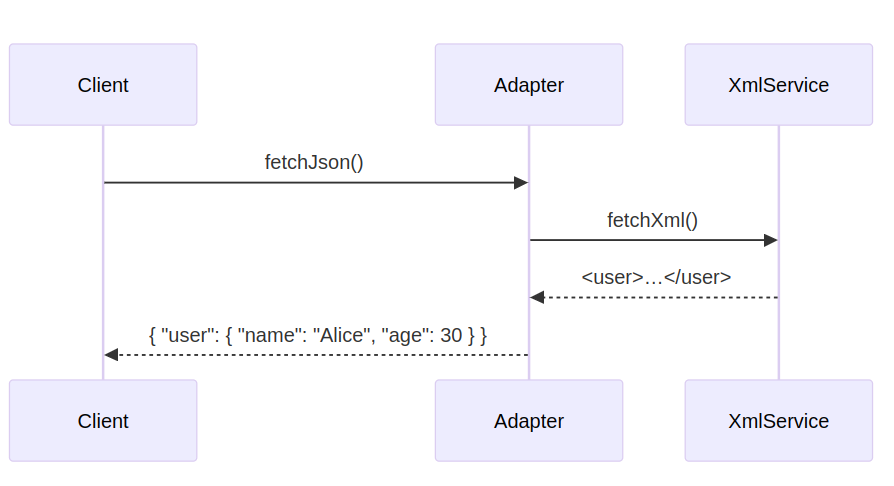
Sequence Diagram:
When to Use
- You have a class with an interface that does not match what your code needs.
- You want to reuse existing classes without changing them.
- You need a middle layer to translate one interface into another.
Pros&Cons
Pros:
- Separates interface conversion from business logic
- Follows Single Responsibility Principle
- Allows reuse of legacy or 3rd‑party code
Cons:
- More classes and interfaces to maintain
- Can add complexity if adapter is trivial
- Clients must know about adapter types
Related Patterns
- Decorator: Keeps the same interface but adds behavior.
- Facade: Provides a simplified interface to many classes.
- Bridge: Decouples implementation from interface at design time.