Understanding AWS Regions and Availability Zones
When you start learning AWS, one of the most important ideas to understand is the concept of Regions.
A Region is a separate geographical area somewhere in the world where AWS places and runs its infrastructure. Each Region works independently from the others to provide strong reliability and protection against failures.
Examples of Region names include:
us-east-1(N. Virginia, USA)eu-west-3(Paris, France)
A Region is made of several physical locations called Availability Zones (AZs). These zones are close enough for fast communication, but far enough apart so that one problem—such as a fire or power outage—does not affect the whole Region.
Most AWS services work inside a single Region. If you use the same service in another Region, AWS treats it as a separate environment. This helps with security, performance, and cost management.
How to Choose an AWS Region
When you deploy an application, you must choose which Region to use. There is no single “best” Region. The right choice depends on several factors.
Compliance and Legal Requirements
Some countries have laws that control where data must stay. This is called data residency.
For example, data created in France may need to remain in France, so you should deploy your application in the French Region (eu-west-3).
Latency and User Location
Latency is the time it takes for data to travel between your users and your application. To give users a fast experience, deploy your application close to the majority of them. For example, hosting an application in Australia will feel slow for users who are mainly in the United States.
Service Availability
Not all AWS services are available in every Region. Before selecting a Region, check whether the services you need exist there. AWS provides a public list that shows service availability across Regions.
If you want to see which services are available in each Region, you can check the official AWS page: Regional Services List.
Pricing Differences
AWS prices are not the same in every Region. Storage or compute services may be cheaper in one Region than in another. These differences can affect your final decision.
Understanding Availability Zones (AZs)
Inside each Region, AWS divides its infrastructure into multiple Availability Zones. AWS operates more than 100 AZs in over 30 Regions worldwide. Most new Regions start with at least three AZs, and some older Regions have even more.
Example from the Sydney Region (ap-southeast-2):
ap-southeast-2Aap-southeast-2Bap-southeast-2C
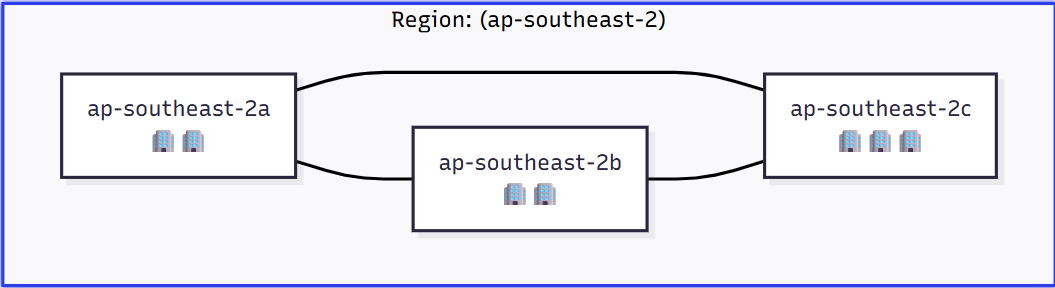
An AZ is made of one or more data centers with their own power supply, networking, cooling, and buildings. AZs are placed far enough apart (sometimes up to 100 km) to avoid a single disaster affecting all of them, but they are connected with fast, low-latency fiber links. Using multiple AZs helps applications stay online even if one AZ has a problem.
A Note on AZ Naming:
The letter at the end of each AZ name (
A,B,C, etc.) is different for every AWS account. This means that “us-east-1a” in one account may not be the same physical location as “us-east-1a” in another account. If you need to coordinate resources across accounts, you must use the internal AZ ID, which is the true identifier of the physical zone
AWS Points of Presence (Edge Locations)
Besides Regions and AZs, AWS also has over 400 Points of Presence (PoPs), also called edge locations. These are used by services like Amazon CloudFront, a Content Delivery Network (CDN). Edge locations store cached copies of your static content—such as images, videos, or web pages—so users can download them from the location closest to them. This reduces latency and improves loading speed.
Summary
- Each Region contains several Availability Zones (usually 3; minimum 3, maximum 6).
- Each Availability Zone (AZ) consists of one or more separate data centers with redundant power, networking, and connectivity.
- AZs are isolated from each other so that a disaster in one AZ does not affect the others.
- AZs are connected by high-bandwidth, ultra-low-latency networking.