Left Join
Author Ter-Petrosyan Hakob
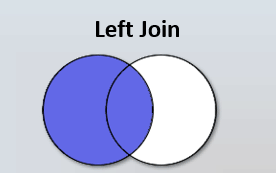
A LEFT JOIN returns all rows from the left table and the matching rows from the right table. If there is no match, the result is NULL on the right side.
SELECT
    c.id        AS category_id,
    c.name      AS category_name,
    g.id        AS good_id,
    g.name      AS good_name
FROM categories AS c
LEFT JOIN goods AS g ON c.id = g.category_id;


  category_id| category_name | good_id |    good_name
-------------+---------------+---------+-----------------
           1 | Electronics   |       1 | Smartphone
           3 | Laptops       |       2 | Gaming Laptop
           3 | Laptops       |       3 | Business Laptop
           2 | Computers     |       4 | Desktop PC
           5 | Kitchen       |       5 | Refrigerator
           5 | Kitchen       |       6 | Blender
           5 | Kitchen       |       7 | Microwave
           4 | Home          |  <null> | <null>
(8 rows)
This query returns all records of the categories table and returns the matched records from the goods table.
As we can see, if the second table (the goods table, in this example) has no matches, the result is NULL .
This diagram gives us an idea of how a left join works:
To list only the categories that have no corresponding goods, you can either use a subquery or filter on a LEFT JOIN:
Using NOT IN:
SELECT *
FROM categories AS c
WHERE c.id NOT IN (SELECT category_id FROM goods );
Using NOT EXISTS:
SELECT *
FROM categories AS c
WHERE NOT EXISTS (
  SELECT 1 FROM goods AS g WHERE g.category_id = c.id
);
Using LEFT JOIN … IS NULL:
SELECT
    c.id        AS category_id,
    c.name      AS category_name
FROM categories AS c
LEFT JOIN goods AS g ON c.id = g.category_id
WHERE g.category_id IS NULL;

 category_id | category_name
-------------+---------------
           4 | Home
(1 row)
Performance note: In most SQL engines, explicit JOIN operations allow the optimizer to choose the best execution plan, often outperforming equivalent IN or EXISTS queries.